Multi-Tenancy Architecture
How SysManage isolates many tenants on one deployment — a control plane plus a dedicated database per tenant — and how that powers the Enterprise SaaS edition.
The two topologies
The same SysManage codebase runs in two shapes. The diagram below contrasts the classic single-tenant deployment (Community, Professional, and on-prem Enterprise) with the multi-tenant topology behind Enterprise SaaS.
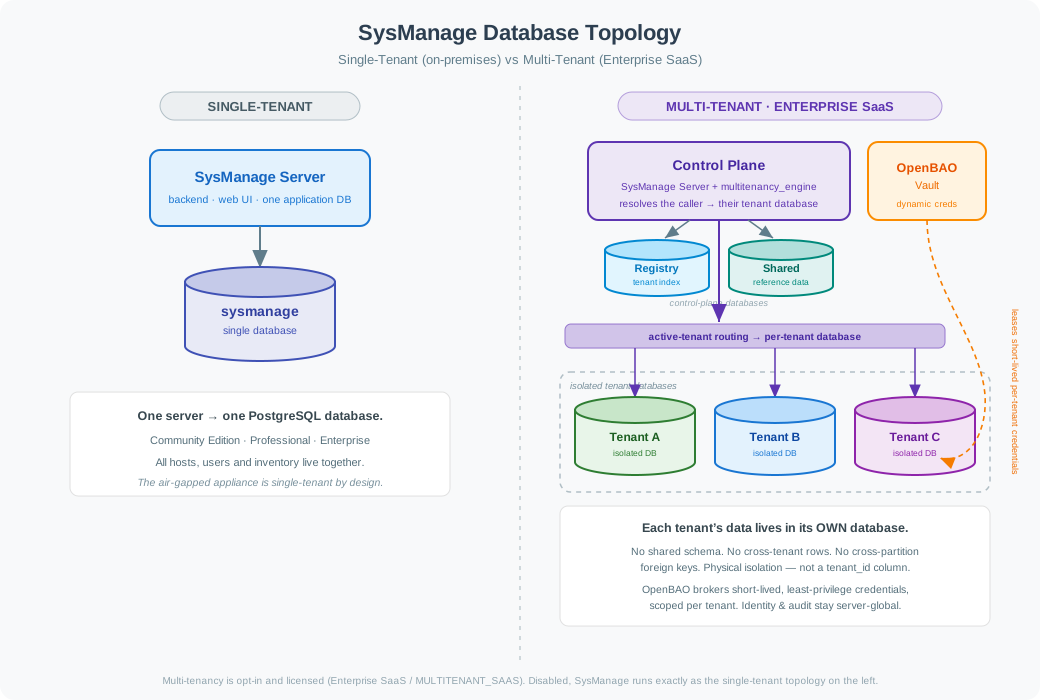
Click the diagram to open the full-size version in a new tab.
Single-tenant
One SysManage server talks to one PostgreSQL database. Hosts, users, inventory, and audit all live together. This is the Community Edition and the on-prem Professional and Enterprise deployments, and it is the only topology an air-gapped appliance ever uses.
Default Nothing about multi-tenancy is active unless you turn it on.
Multi-tenant
A control plane fronts many tenants. Control-plane metadata lives in a registry database; each tenant's operational data lives in its own database. The server resolves the caller to their tenant and routes every query to that tenant's database. OpenBAO brokers a short-lived, least-privilege credential per tenant.
Enterprise SaaS Licensed and enabled per deployment.
Control plane and tenant silos
A multi-tenant deployment is split into a small control plane and any number of tenant silos:
Control plane
The control plane is the SysManage server itself plus the licensed multitenancy_engine. It owns the tenant registry — which tenants exist and which database each one is placed in — and it is the only component that decides, per request, which tenant database to use. It also holds the small amount of genuinely cross-tenant state: the catalog of tenants and their placements.
Tenant silos
Each tenant is a silo: its own database, reached with its own credentials. A tenant silo contains everything host-scoped — hosts, packages, hardware inventory, compliance results, the agent message queue, and the tenant's own audit-relevant operational data. One tenant can never see another tenant's silo because it never holds a connection to it.
Database partitioning
SysManage organizes tables into three partitions, distinguished by table-name prefix, so it is unambiguous at the schema level where each table belongs:
| Partition | Prefix | Lives in | Holds |
|---|---|---|---|
| Registry | registry_* | Control plane (registry DB) | The tenant catalog and per-tenant database placements. |
| Shared | shared_* | Control plane (shared DB) | Canonical reference data that is identical for every tenant (for example the CVE/NVD catalog). |
| Tenant | (unprefixed) | Each tenant's database | All host-scoped operational data — one copy per tenant. |
No cross-partition foreign keys
Because the partitions can live in physically separate databases, a foreign key can never point across a partition boundary — PostgreSQL cannot enforce a constraint into another database. Where a logical reference is needed across partitions (for example a row that records which server-global user created it), SysManage stores a soft reference: the GUID is kept, but no database-level foreign key is declared. This keeps each database self-contained and independently migratable.
Three migration chains
Each partition has its own Alembic migration chain — registry, shared, and tenant — with separate version tables. The registry and shared chains run once against the control-plane databases; the tenant chain is applied to every tenant database. Schema is open-source and identical for all tenants; only the routing logic that decides which database to touch is licensed.
Request routing
Routing is the heart of the data plane. Every request carries an active tenant — established from the authenticated session and JWT — and a single routing seam turns that into the right database connection:
- User requests. Middleware binds the active tenant for the request; data-plane endpoints resolve their database session from it, so a tenant user only ever reads and writes their own database.
- Server-wide background work. Jobs that must touch every host — the heartbeat sweep, the store-and-forward queue processors, the repository-mirror and upgrade-profile schedulers — fan out across the bootstrap database and every provisioned tenant database, one isolated session each.
- Agent traffic. Agent reports flow through a durable, per-tenant message queue. Each inbound message is resolved to its host's tenant and written into that tenant's database; a bound host's data always lands in its own silo.
Fail loud, never guess
If the router cannot resolve a tenant for a piece of work, it logs loudly with full context and stops — it never silently falls back to a default database. Misrouting tenant data is treated as a correctness bug, not something to paper over.
The identity boundary
Not everything is per-tenant. SysManage draws a deliberate line:
| Server-global (control plane) | Per-tenant (silo) |
|---|---|
| User accounts, authentication, roles/RBAC, MFA, password-reset and external-IdP state, the tenant registry, licensing. | Hosts and their inventory, packages, compliance results, the agent message queue, and the tenant's operational data. |
Login is not per-tenant — a person authenticates once against the server — but the moment they act on managed data, that data is served from the active tenant's database. Keeping identity server-global while keeping managed data per-tenant is what lets one operator administer many tenants without ever mixing their fleets.
Binding a host to a tenant
A host belongs to exactly one tenant, decided at registration. An operator issues a tenant-scoped enrollment token from the control-plane UI and drops it into that host's agent configuration. When the agent registers, the server validates and consumes the token and records the host→tenant binding in the registry. From then on the agent is oblivious to tenancy: it just reports, and the server routes its data to the right silo. See the multi-tenant security and deployment guides for the operator workflow.
Provisioning and credentials
New tenants can be provisioned self-service from the control-plane UI. A least-privilege provisioner identity creates the tenant's database and registers it — the server never holds database-superuser rights. At run time, the tenant's database credentials are brokered by OpenBAO: short-lived, dynamically issued, and scoped to a single tenant. The full security treatment — why this design is hard to attack — is covered in the Multi-Tenant Security guide.
Opt-in and licensing
Multi-tenancy is entirely opt-in. With it disabled, none of the routing, registry, or per-tenant machinery is active and SysManage behaves exactly like the single-tenant topology — the same code, the same one database. The multi-tenant routing engine is part of the licensed Enterprise SaaS tier (MULTITENANT_SAAS); the database schema and partitioning themselves remain open-source. Without the licensed engine, a deployment configured for multi-tenancy fails loudly with a clear licensing error rather than misrouting.
Related documentation
🔐 Multi-Tenant Security
Why per-database isolation, OpenBAO-brokered credentials, and the identity boundary make this design exceptionally hard to attack.
Security treatment →🚀 Enterprise SaaS
The multi-tenant, hosted edition: what it includes, who it is for, and how it compares to Community, Professional, and Enterprise.
Enterprise SaaS edition →⚙️ Deployment
Standing up a multi-tenant deployment: the registry and tenant databases, OpenBAO, the three migration chains, and provisioning.
Deploy multi-tenancy →🗄️ Database Design
The underlying schema, entity relationships, and persistence patterns that the partitions are built on.
Database design →